JSON Schema Validator
Validate JSON data against a JSON Schema. This online JSON Schema validator lets you validate JSON against schema, check structure, data types, required fields, and constraints, and get detailed error messages — all in your browser.
Key Features
Schema Validation
Validate JSON data against JSON Schema Draft 7. The tool checks data types, required properties, value constraints, and nested structures to ensure your JSON conforms to the expected schema.
Error Details
Get detailed error messages with JSON path information when validation fails. Each error points to the exact location and reason, such as missing required fields, type mismatches, or constraint violations.
Copy & Export
Copy validation results or error details to your clipboard. You can use the output in documentation, bug reports, API testing workflows, or team communication.
Nested Support
Validate deeply nested objects and arrays, including complex schemas with multiple levels of properties, items, and conditional rules.
URL Input
Load JSON data and JSON Schema from a URL using the ?url= parameter when your workflow provides publicly accessible resources. Review the loaded content before running validation.
Private
All schema validation happens in your browser. Your JSON data and schema are not uploaded to a server, which is useful when working with private API payloads or configuration data.
How to Use
Paste your JSON
Paste the JSON data you want to validate into the JSON Data field. This can be an API request or response, a configuration file, or any JSON document you need to check against a schema.
Paste your Schema
Paste your JSON Schema into the JSON Schema field. The schema defines the expected structure, data types, required fields, and constraints for your JSON data.
Click Validate
Click Validate to check whether your JSON conforms to the schema. The tool will report success or show detailed errors with paths and descriptions.
Review and fix
If validation fails, use the error messages to locate and fix issues in your JSON or schema. You can re-run validation as many times as needed until the data matches the schema.
{
  "name": "Alice",
  "age": 30,
  "email": "alice@example.com"
}✅ Valid — matches schema
How to Validate JSON Data Against JSON Schema
What is JSON Schema Validation?
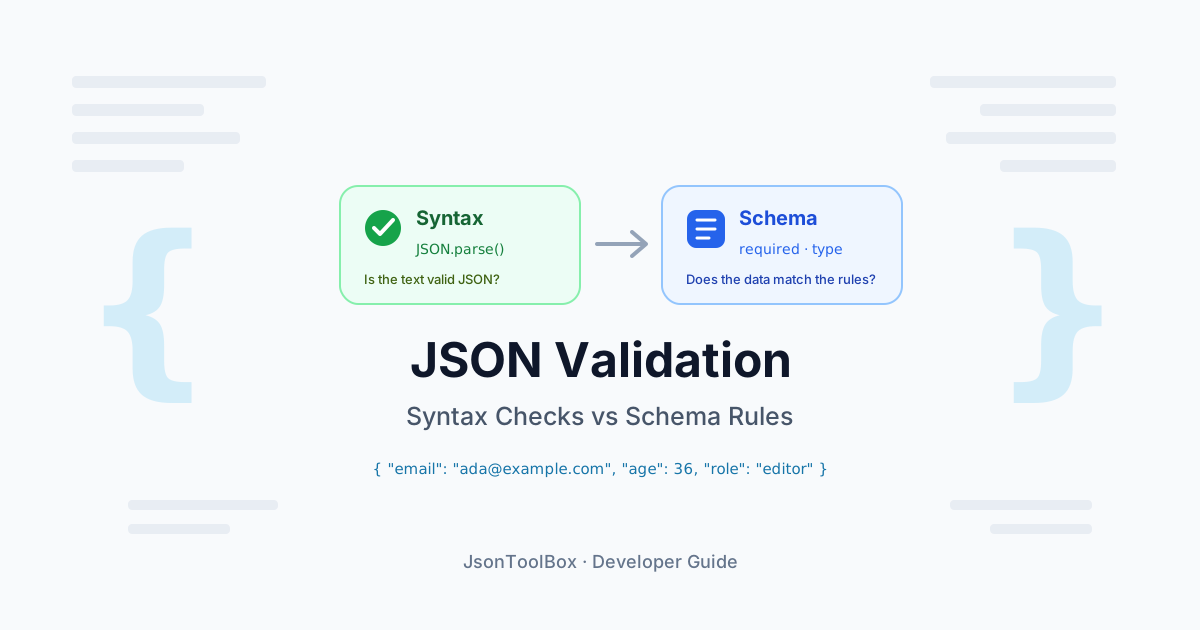
JSON Schema validation checks whether JSON data conforms to a defined structure, data types, and constraints. A JSON Schema describes what a valid JSON document should look like, including required properties, allowed types, value ranges, and patterns.
This type of validation is essential for ensuring data quality in APIs, configuration files, data pipelines, and any system that relies on structured JSON input.
Why Validate Against Schema?
- API quality: Ensure incoming requests and outgoing responses match the expected format
- Data integrity: Validate data before processing or storing it
- Error prevention: Catch structural and type errors early in development
- Documentation: Use the schema as living documentation of your data contract
- Consistency: Enforce consistent shapes across different services and clients
What Can JSON Schema Validate?
- Data types: string, number, integer, boolean, array, object, null
- Required fields: Mark specific properties as mandatory
- Constraints: Minimum and maximum values, string lengths, regex patterns, enum lists
- Nested structures: Validate complex nested objects and arrays with items and additionalProperties
- Conditional rules: Apply different subschemas based on conditions (in more advanced schemas)
How to Validate JSON Against a Schema
- Paste JSON data: Add the JSON document you want to validate in the JSON Data field.
- Paste JSON Schema: Add the JSON Schema that defines the expected structure and constraints.
- Click Validate: Run the validation to check whether the JSON conforms to the schema.
- Review results: If validation succeeds, you will see a success message. If it fails, review the detailed errors with paths and descriptions.
- Fix and re-validate: Adjust your JSON or schema based on the error messages, then run validation again.
Common Schema Keywords
- type: Define the expected data type (object, array, string, number, etc.)
- required: List property names that must be present
- properties: Define the structure and subschemas for object properties
- items: Define the schema for array elements
- minimum / maximum: Set numeric value constraints
- minLength / maxLength: Set string length constraints
- pattern: Enforce a regular expression pattern on strings
- enum: Restrict a value to a fixed set of allowed options
Typical Use Cases
- API testing: Validate request and response bodies against API schemas
- Configuration validation: Ensure configuration files match the expected structure
- Data contracts: Enforce agreed-upon data shapes between services
- Form data: Validate JSON generated from forms or UI components
- ETL and pipelines: Check incoming data before transformation or loading
Tips for Effective Schema Validation
- Start with a clear schema: Define your data contract before validating large amounts of data
- Use descriptive errors: Leverage the error paths to quickly locate issues in nested structures
- Iterate gradually: Begin with a simple schema, then add more constraints as needed
- Separate concerns: Use different schemas for different contexts (e.g., create vs update payloads)
- Keep schemas versioned: Track schema changes alongside your API or data format versions
Client-Side Privacy
This JSON Schema validator processes input in your browser instead of requiring an upload to a remote service. That can be convenient for development data and private configuration snippets. However, you should still avoid entering passwords, API keys, access tokens, or other highly sensitive information into any browser-based tool.
Related Articles